Fitness trackers and smartwatches are an interesting kettle of fish. There are so many options out there these days – all of which offer different features – that choosing the right one, with the right tracking for you, is no mean feat.
In my experience, anyone who has a tracker or smartwatch on their wrist typically stays loyal to the same company, upgrading every few years to the latest Apple Watch, Garmin, Samsung or Fitbit, depending on where you started. To switch means losing all your streaks, badges and data and that’s not what anyone wants. I also know people that use Apple during the day and Fitbit at night for example, as well as those that are die hard Garmin users and wouldn’t even consider another device.
Still, companies continue to produce new models with new features, trying to entice users interested in tracking their health and fitness to make the switch, or upgrade to the latest model. Garmin’s Lily 2 was announced at the beginning of 2024, succeeding the initial Lily smartwatch that focused on women, as this second-generation model does. I’ve worn it for the last month, alongside my Apple Watch Series 9, because while the Lily 2 has remained on my wrist longer than I initially expected it to, it doesn’t have the 9 years of history my Apple Watch has. This is why the Lily 2 hasn’t left my wrist yet.
The Disconnekt Downlow
Pros
+ Elegant design
+ Good accuracy
+ Body Battery and stress tracking
Cons
– Some features missing
– No workout pause option
– Display could be better
The Garmin Lily 2 is lightweight, elegant and it offers a good range of features, from Body Battery and stress tracking to accurate activity tracking. It’s not perfect – there’s no built-in GPS, the display could be better and sleep tracking and women’s health tracking could be improved. But, for those who exercise casually and want a slim and stylish tracker that does many things very well, and with a decent battery life, the Garmin Lily 2 is a good choice to consider.
The reasons you should choose the Garmin Lily 2
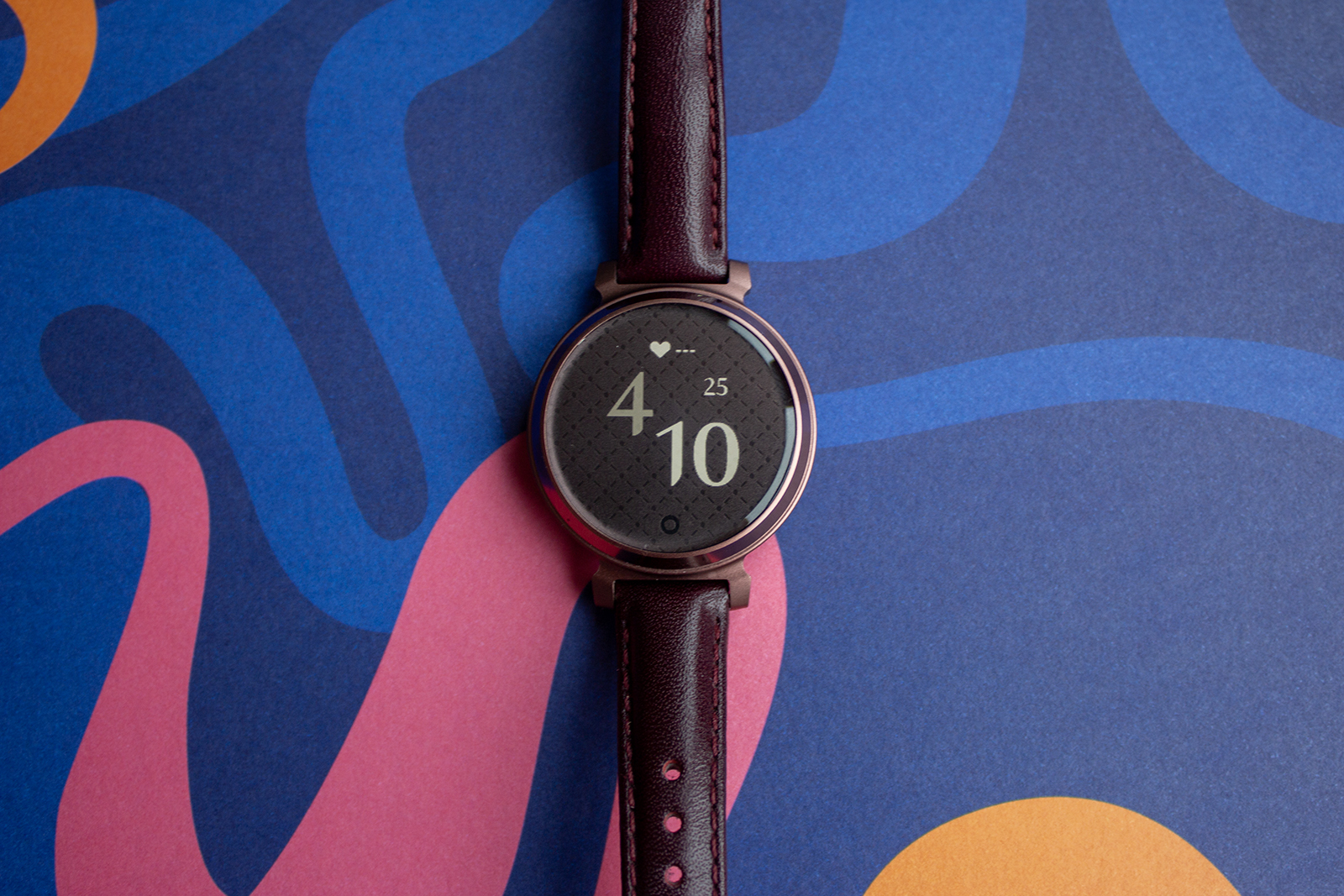
When I first pulled the Garmin Lily 2 out of its box, I can’t say I was overcome with excitement. I don’t have dainty wrists so this exceptionally small and elegant fitness tracker was a far cry from what I am used to wearing. I also didn’t love the Mulberry leather strap of my Garmin Lily 2 Classic review unit. Nobody is more surprised than me therefore, that this dainty little device remains on one of my wrist weeks after I finished testing it.
The circular anodised aluminium body of the Lily 2 has a lovely premium finish, it’s incredibly comfortable to wear – as in barely noticeable – and the Mulberry leather strap grew on me over the weeks, even if the patterned lens that sits above the monochrome display remains questionable in my eyes. It’s a fitness tracker that looks good with smarter clothing: it could very easily pass for a standard watch and there’s a lot to be said for that.


IMAGE CREDIT: THE DISCONNEKT
But the Lily 2’s biggest attributes aren’t in what it looks like. Instead, it’s the accuracy of the activity tracking, the great set of fitness and health features on offer and Garmin’s Body Battery and stress tracking features that are quite simply excellent, not to mention addictive.
Garmin isn’t the only company to offer a feature that indicates how ready your body is for the day ahead – Fitbit does it too in its Daily Readiness Score – but Garmin was first with Body Battery and it has had time to develop the feature into what feels like a very accurate number every day. Have a few late nights, a few bad night’s sleep, and a couple of stressful days and you’ll watch that Body Battery number deplete rapidly.
Let me tell you, getting it back to 100 when you’ve done that takes weeks. Ultimately, if your heart rate is high but your body isn’t moving much, that Body Battery number will be at five by the end of the day – it doesn’t hit zero ever as I guess that would suggest you’re dead – and even 8 hours of sleep only ever got me back to 70 per cent at best the next day.
“
Have a few late nights, a few bad night’s sleep and a couple of stressful days and you’ll watch that Body Battery number deplete rapidly. Let me tell you, getting it back to 100 when you’ve done that takes weeks.
Stress tracking is also a feature I very much enjoyed on the Garmin Lily 2 and it is one of the reasons this tracker has yet to come off my wrist. You get a daily stress score, which is calculated based how long you spend in four zones: Rest, Low, Medium and High. These also contribute to Body Battery so everything is connected to some degree. It is tricky to quantify how accurate this element is, but I found it interesting to see the impact certain things (like commuting into London for the day) had on my stress score and how it encouraged me to consider doing less on some days, or slow down a little.
What the Garmin Lily 2 could do better
For all its great features, there are a couple of areas the Garmin Lily 2 isn’t marvellous. On the design front, a non-patterned lens as an option would be a welcomed addition and the monochrome screen could be more responsive, as well as brighter.
There’s no built-in GPS, which means if you’re using this for walking outdoors or running, then you won’t get accurate map data without your phone with you. There are also a limited number of workout options. There’s no indoor cycling option for example, and as a Peloton user, that was irritating for me as it meant I had to use the Cardio option to track cycling as a workout and I would say that indoor cycling is a pretty standard activity to want to track. Not to mention Garmin is known for offering decent outdoor cycling stats.


IMAGE CREDIT: THE DISCONNEKT
Elsewhere, there is no easy way to pause a workout. You have to press and hold the capacitive button at the bottom of the Lily 2’s display to pause, which takes several seconds. You’ll be greeted with a screen that lets you save the activity you are doing, resume it or delete it. Just being able to tap the display to pause would make for a much smoother user experience.
Sleep tracking is also not as good as Fitbit or Apple Watch in my experience. The graph is harder to read and Garmin occasionally cut sometimes as much as 30 minutes off my sleep compared to the Apple Watch Series 9, which when that contributes to that all important Body Battery percentage, is very frustrating. It is comfortable to sleep in, which goes in its favour, but the sleep tracking could be better and more of the data collected by Garmin throughout the day could be used to give better insights. “You had a very busy day today, you sleep better when you have days like this”, for example.
Last but not least, I think women’s health tracking could also be better – especially given that this device is targeted at women. It offers the ability to track your period and add symptoms, but this is all manual. Garmin also doesn’t take that information into account when it comes to your Body Battery or the stress tracking, both of which would be affected by the different stages of a woman’s cycle. With no body temperature sensor on the Lily 2 either, there are no predictions for periods based on physical data like Apple Watch Series 9 offers, so it ends up being a somewhat pointless feature unless you’re prepared to manually enter all the data all the time.
The Garmin Connect app
Let’s talk about the Garmin app, as while there are plenty of features on the Lily 2 itself, the Connect app is where you’ll find most of the data. Overall, the Garmin Connect app is a little clunky and while half the data is presented in a nice and easy to read format, dive a little deeper into the graphs and it all feels a bit unconsidered. It’s almost like half the app has been designed for usability and the other half is just for functionality.
That said, there is plenty of data on offer, and while the insights could be better, with Garmin making better use of the data it collects to indicate patterns and behaviour, it’s easy enough to navigate. There are five main tabs – My Day, Challenge, Calendar, News Feed, More – with the My Day tab delivering a summary of the main metrics the Lily 2 collects. Each of those metrics allows you to dive a little deeper in order to access more information, including by the week, by the month and by the year, and it’s here where I particularly enjoyed the Body Battery and stress tracking features.

IMAGE CREDIT: THE DISCONNEKT
The Hydration element of the Garmin Connect app was also one of my favourites, with your daily hydration goal adapting depending on what activity you had done that day.
More is where you’ll find settings and the ability to set up Garmin Pay (on the Lily 2 Classic), as well as add various activities and access other safety features like LiveTrack that enables someone to track you if you are on a run or cycle for example. News Feed gives you a breakdown of what any of your connections have recently accomplished, and Calendar gives you a monthly overview of colour-coded lines, none of which mean anything until you click on each individual day. Challenges meanwhile, allow you to join Garmin-wide challenges or compete against your contacts in steps, swimming, running or cycling.


IMAGE CREDIT: THE DISCONNEKT
Should you buy the Garmin Lily 2
The Garmin Lily 2 is an excellent fitness tracker overall for someone who exercises casually and wants something slim and elegant on their wrist, offering decent battery life and some good features. Body Battery is fantastic, stress tracking is also great and the Lily 2 offers great accuracy for activity tracking, including heart rate and steps.
The display could be brighter and more exciting, sleep tracking and women’s health tracking could both be improved and I’d ditch the patterned lens if I had a choice for a redesign. For more advanced users, there are better fitness trackers out there for around the same price with more features, including from Garmin itself in the Vivoactive and Forerunner ranges.
With all that said, if you’re after a lightweight, accurate fitness tracker that doesn’t look like a smartwatch and offers some excellent features, the Garmin Lily 2 is certainly worth consideration.

IMAGE CREDIT: THE DISCONNEKT
FAQs
The Garmin Lily 2 and the original Garmin Lily look similar, though there are a few differences of note. The Lily 2 allows for standard 14mm straps rather than proprietary ones, whilst also introducing Sleep Score, a more advanced heart rate sensor and a couple of extra activity modes, including Dance. There was also a switch to anodised aluminium over stainless steel.
The main difference between the Garmin Lily 2 Classic and the Garmin Lily 2 is that the Classic model has Garmin Pay, allowing you to pay with your wrist if you have a compatible bank card – of which there aren’t many in the UK. There are also slightly more expensive straps on the Classic, including leather options over silicone.
How long does the Garmin Lily 2 battery last?
Garmin claims the Lily 2’s battery will last around five days and I find that to be accurate. Charging is slower than the likes of the Apple Watch, so you’ll need to allow for at least an hour to get it to full, but thankfully you don’t need to do that every day.