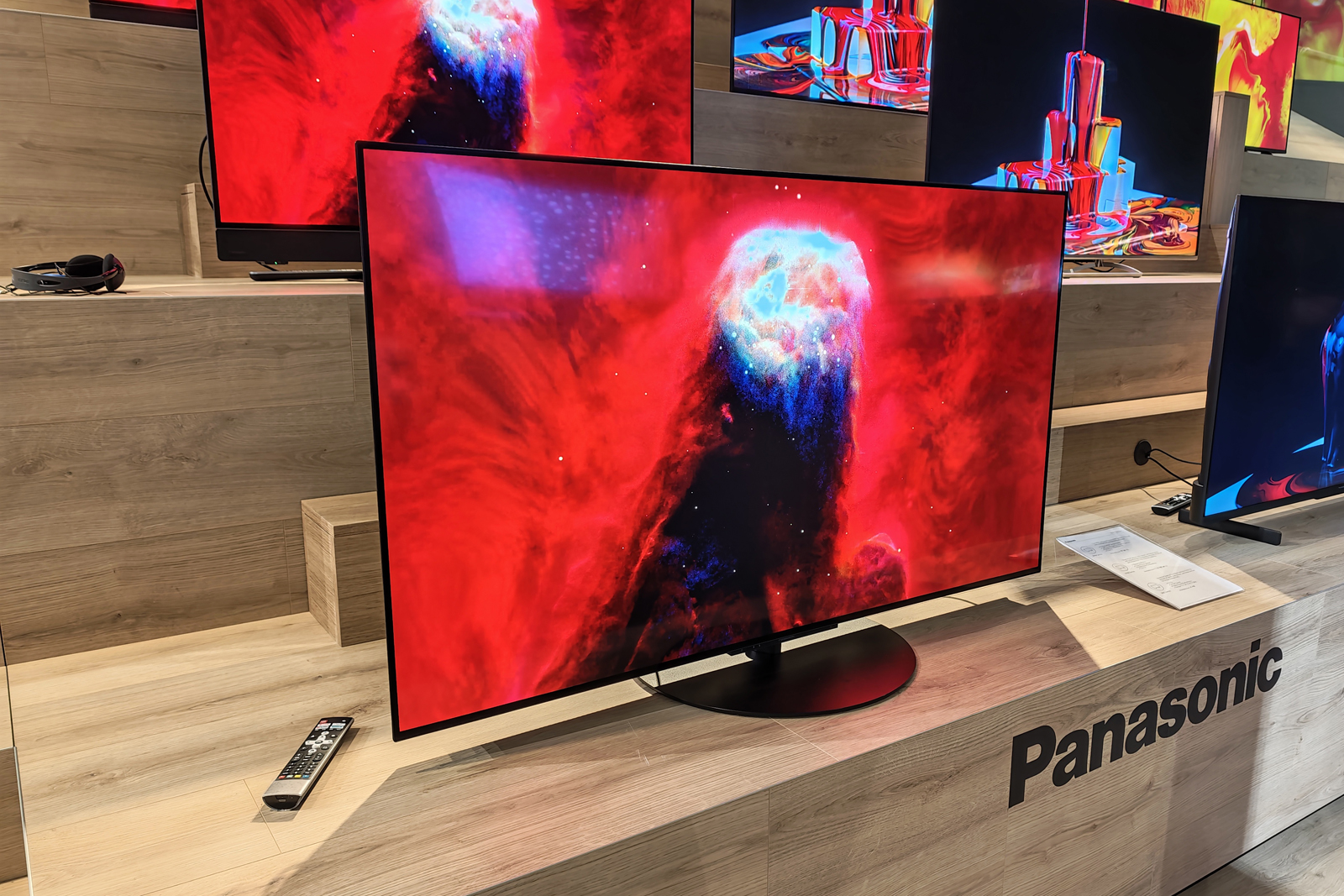
The Panasonic Z95B is the company’s flagship OLED model for 2025. It picks up the same screen technology as LG’s OLED G5, pairs that with a Technics-tuned sound system, wraps the whole thing in mesh making it one of the best-looking TVs you can buy, and nestles into the pack of premium TVs vying for your money.
The aim is to be a one-box solution for your entertainment, negating the need for a separate sound system as it looks to deliver Dolby Atmos without any additional speakers. It replaces and updates the Panasonic Z95A – which used MLA OLED tech for the screen which isn’t as bright – while beneath this model is the Panasonic Z90B, which again uses a different OLED panel and cuts the speaker output by more than a half.
I’ve been testing the Panasonic Z95B OLED to see if this is really where the smart money goes.
The Disconnekt Downlow
Pros
+ Superb picture quality
+ Broad HDR format support
+ Best TV design you’ll find
Cons
– Sound system won’t compete with a good soundbar
– Only two full bandwidth HMDI 2.1
The Panasonic Z95B is a premium OLED TV that offers stunning picture performance in one of the nicest designs you’ll find on a TV, thanks to the mesh finish. There’s an integrated sound system that does a great job of creating immersive audio from Dolby Atmos content, while the picture is rich and detailed with deep blacks and colours, and adept at showcasing HDR highlights too. The Fire TV system offers a full suite of streaming services with support for all the HDR formats, while Alexa voice control and a useful remote round out the package. However, only two of the HDMI ports support the full 2.1 offering, while the sound system is a little limited and might not suit those who want to crank the volume up. The Panasonic Z95B is an easy TV to live with, with a couple of tweaks to the settings really bringing out the picture. If you’re looking for the best single box solution, look no further.
Design, connectivity, remote
I’ve said before that the Panasonic Z95B is probably the best looking TV that you can buy right now. Rather than offering the sort of super-slim design that you get from LG’s OLED G5 (designed for seamless wall mounting), the Z95B embraces its slightly larger frame and makes it look good.
Because there’s a soundbar across the bottom of the screen, this is a thicker TV than many, but Panasonic’s solution is to wrap this TV in mesh, just like your favourite speaker, so that it’s not just acres of black plastic, which most TVs are. The added depth is needed to make those speakers breathe, so why not make everything look good?
The result is that the edges of this TV look better than most and while the back is still finished in plastic, Panasonic has put in the time to add covers for the cables so you can achieve a really tidy installation. Add to that the central swivel stand and you have a TV that you can easily adjust to suit the seating in the room.


IMAGE CREDIT: THE DISCONNEKT
There are four HDMI sockets on the rear of the Panasonic Z95B, but only HDMI 1 and 2 support the full bandwidth that HDMI 2.1 has to offer. That means that if you’re connecting the latest consoles like the Xbox Series X or PS5, or a PC, it’s here you’ll find support for low latency, variable refresh, AMD Freesync and G-Sync.
HMDI 2 is also the eARC, so if you were going to connect a sound system you’ll lose one of the HDMI 2.1 ports. That means there are some limitations in connectivity compared to rivals like the Samsung S95F or the LG G5 OLED.
Panasonic has stuck to the same remote for a couple of years, avoiding the trend of offering a teeny-tiny remote alongside a larger buttoned remote. Instead, Panasonic goes with a full-on slab of remote with loads of buttons. I actually really like it.
“
Panasonic goes with a full-on slab of remote with loads of buttons. I actually really like it.
That’s not because I’m an old fuddy-duddy, but there’s some retro charm here, and it means less menu surfing and more direct action. There are shortcuts for major streaming services, a shortcut for the picture menu to change the mode, numbers for TV channel hopping and controls for connected devices. There’s even an input selector, which most modern minimalised remotes eschew.
But, as I said before, my favourite thing remains the ability to press and hold the home button to open a quick menu, at the bottom of which is “info”. This will tell you the picture and audio format that’s being played, along with the frame rate. If you ever wonder whether your TV is playing what you expect, it’s here that you’ll find it.
Four essential Panasonic Z95B specs
160
Watts
The sound system delivers 160W of power from a 70W front array, 30W side, 30W upfiring and a 30W woofer.
40
Per cent
The Primary RGB Tandem panel claims 40 per cent enhanced light efficiency for better colours and brightness.
23.5
Kg
The TV weighs 23.5kg with the stand which offers swivel to easily change the position.
144
Hz
The 144Hz display offers support for smooth gaming for the latest consoles and PCs.
Streaming and user interface: Fire TV and Freely
Fire TV doesn’t have the best reputation among TV reviewers, who often cite that it’s full of adverts and slow, while suggesting that webOS or Tizen OS are better (on LG and Samsung TVs). I don’t agree, but there’s a degree of subjectivity here, so let me explain.
Fire TV has a leaning towards Prime content and the interface will show promotional content at the top in a carousel. This will auto play (with sound) if you don’t turn those options off in the menu – the first port of call is to switch those off. Fire TV will then insert a banner lower down the page – during testing this was for a Disney+ show, but I’ve seen products from Amazon being advertised here.
Put those things to one side and the advantages of Fire TV add up. There’s integration into Alexa (if you happen to use the service) as well as handsfree voice control. Alexa is far superior to many of the systems offered by rivals – that’s why it’s also an option on LG and Samsung TVs alongside proprietary offerings. Finding content with Alexa is better on Fire TV: it’s faster and more responsive.


IMAGE CREDIT: THE DISCONNEKT
Fire TV supports all the major streaming apps and a whole lot more besides, as well as offering information from Alexa, like weather. It’s a true smart TV experience. Panasonic enriches the experience by expanding the picture control settings, so you get a lot more here than you do on the Fire TV Omni Mini-LED for example.
The discovery and resumption of programmes is also great, because when you land on the thumbnail for a streaming service, you’ll get suggestions from that service – often including what you were watching last. This is much better service than you get from Tizen OS on Samsung TVs where you just get the icon.
Beyond Fire TV (whether you like it or loathe it), there’s Freely for those in the UK. This is the new system that serves up terrestrial TV over your home internet. That means there’s no need for an aerial connection, you just connect your TV to the Wi-Fi (or Ethernet, if you wish) and start streaming live TV instead.
This makes installing a new TV so much faster, without the worry of how to plug it in. I’ve moved many of my home TVs over to Freely and I’m not looking back. There’s a Freeview tuner for those who don’t want to rely on Wi-Fi.
Picture, sound, performance
The real reason you’ll part with big money for a TV is because of the performance and mostly the picture. The Primary RGB Tandem OLED panel that’s in the Panasonic Z95B offers much higher brightness than the Z95A, for better results. This is amongst the brightest picture you’ll get from an OLED TV and the picture looks great as a result.
The display finish on the Z95B is glossy, but it’s treated with an anti-glare finish so it deals with reflections nicely. Yes, if there’s a bright light source like a window opposite the screen you’ll get a reflection, but it’s well handled, with the brightness to punch through and the worst of the reflection dissipated. It’s not as effective as the matte screen on the Samsung S95F, however, so if your room is really bright and full of glass, that’s a natural alternative.
But daytime viewing on the Z95B is perfectly possible thanks to the tech that’s here – and it’s a pleasure to watch. It’s a sumptuous showing, full of detail with great upscaling, but with delicious handling of HDR content. Unlike LG, Samsung or Sony, Panasonic chooses to support both Dolby Vision and HDR10+, so you can get the full flavour of HDR as presented.

IMAGE CREDIT: THE DISCONNEKT
It’s accurate too, when using Filmmaker Mode, but I’d forgive anyone who prefers to watch in Standard mode instead, which is brighter. I fired up Glass Onion on Netflix and the Standard mode brings the brightness that I feel this film needs to give it that Aegean summer look. Purists might roll their eyes, but half the point of buying a premium TV is to get the picture you want.
That’s not helped by the fact that Filmmaker Mode is a little muted. You can turn up the luminance to improve it, while I also found I needed to tweak the motion controls slightly to smooth things out to my liking. While watching the gloriously dark Wednesday I found the screen “flashing” between cuts, where turning off the ambient light sensor can calm things down and make everything look more settled.
So a couple of tweaks are definitely worth the effort.


IMAGE CREDIT: THE DISCONNEKT
Panasonic has packed in 170W of sound into the Z95B with a built in woofer and height speakers. It’s a great system that is more immersive than normal speakers, capable of appreciable volume. It definitely sounds better than most TVs at this level, thanks to the distribution of speakers.
But it’s not perfect and a half-decent soundbar will give you a better sound experience. I tried tweaking the sound to improve it, turning on the bass boost to add richness to every day audio which worked a treat – but in big movie moments with the volume turned up, this lead to some distortion and vibration from the back cover of the TV.
Ultimately, the picture performance is excellent and I’m very happy with it, it’s a great experience for watching your favourite content. But if you like big volume and want something that’s going to punch out sound, at this level, you’d probably want a soundbar.
Should you buy the Panasonic Z95B?
The Panasonic Z95B is a television for those looking for excellent picture performance wrapped in a really premium design and offering top class Fire TV experience with all the benefits that come with that. The pedestal stand with swivel, the remote with all the controls you need, the excellent voice control from Alexa – these things make the Panasonic Z95B a pleasure to live with.
If you want a TV you can take out of the box, setup in your spacious open-plan living space where people can admire both sides of the set, without the mess of lots of wires and additional boxes, then this could be the perfect TV for you.
But if you have high demands for sound, then the included sound system becomes its Achilles’ heel. You’re paying more for those speakers: the LG OLED G5 is fractionally cheaper than this Panasonic, while offering the same type of panel for great OLED brightness – and that could be a problem for Panasonic.

IMAGE CREDIT: THE DISCONNEKT
FAQs
Both TVs use the same panel technology in Primary RGB Tandem OLED, stacking OLED layers for increased brightness. Panasonic and LG use different processing technology and the LG TV appears to be slightly brighter out of the box. Panasonic has a more advanced sound system and a great swivel stand, while the remote is easier to use than LG’s. The LG OLED G5 offers four HDMI 2.1 for better connectivity and has a slimmer build, ideal for wall mounting. The LG OLED G5 also support 165Hz compared to 144Hz on the Panasonic Z95B.
The Panasonic Z95B is a great TV for gaming, as long as you have enough connections for your devices, as only two of the HDMI 2.1 support features like ALLM, VRR, G-Sync and FreeSync. This panel offers 144Hz support so it’s great for PC gamers too. There is a game control bar once you’re connected, while the picture quality is immense.
Yes, Panasonic is one of the brands that supports all formats for HDR including Dolby Vision and HDR10+, as well as HLG. That means you get more advanced HDR content than some rivals, which will default to HDR10 if they don’t support the supplied format. Netflix is a great source of Dolby Vision content, while Prime Video has lots of HDR10+ content.