If I asked you what you missed most about the old MacBook Pro, what would you say? The keyboard? The ports? Maybe even the Touch Bar? For me, it’s the glowing Apple logo on the lid. It disappeared when Apple redesigned the MacBook Pro in 2016, and while I know it’s a silly thing to get attached to, I loved it. Imagine my face then, when I opened the new MacBook Pro with the PROLED XDR Display and saw the logo lit up again.
Of course, a light-up logo isn’t going to sell a laptop that starts at nearly £3,000, and thankfully there’s a lot more to talk about here. Some MacBook Pro updates over the years have been hard to tell apart, but there’s no trouble spotting the changes this time. There’s a tandem OLED display, with touch on a Mac for the first time, a Dynamic Island in place of the notch, faster chips and a lighter, thinner body. I’ve spent the last week with the 16-inch model, and here’s what I think.
The Disconnekt Downlow
Pros
+ Stunning display
+ Touch and Dynamic Island are useful
+ Lighter and thinner
+ Glowing logo returns
Cons
– Very expensive
– Still no Face ID
– Design could have gone further
– No power adapter in box
The MacBook Pro with PROLED XDR Display is a brilliant laptop, and easily the most exciting MacBook Pro Apple has launched in years. The tandem OLED display is superb, touch is more useful than I thought it would be as someone who has done without it for the last 20 years, and I’m all for Dynamic Island over the notch. Performance is excellent; the lighter, thinner design makes the 16-inch model easier to carry around and I absolutely love that the glowing Apple logo is back. It is very expensive, though, there’s still no Face ID and I’d have liked a little more of a redesign. But if you can justify the price, you won’t be disappointed.
The reasons you should choose the MacBook Pro with PROLED XDR Display
I should say from the off that I prefer the 14-inch MacBook Pro. It’s the perfect size for a plane tray table, it fits in my everyday bag, and I’ve never needed anything larger. But Apple sent me the 16-inch model, so I fully expected to spend the week moaning about it. That didn’t happen, mainly because of the weight. The 16-inch model starts at 1.82kg, about 320g lighter than before, and it’s slimmer at 16mm too. It doesn’t sound like much, but you notice it as soon as you pick it up. I’d still choose the 14-inch, but the 16-inch is much easier to live with than it used to be. If you’re wondering, the 14-inch model now weighs 1.38kg and measures 15mm, so it’s actually lighter than the 15-inch MacBook Air.
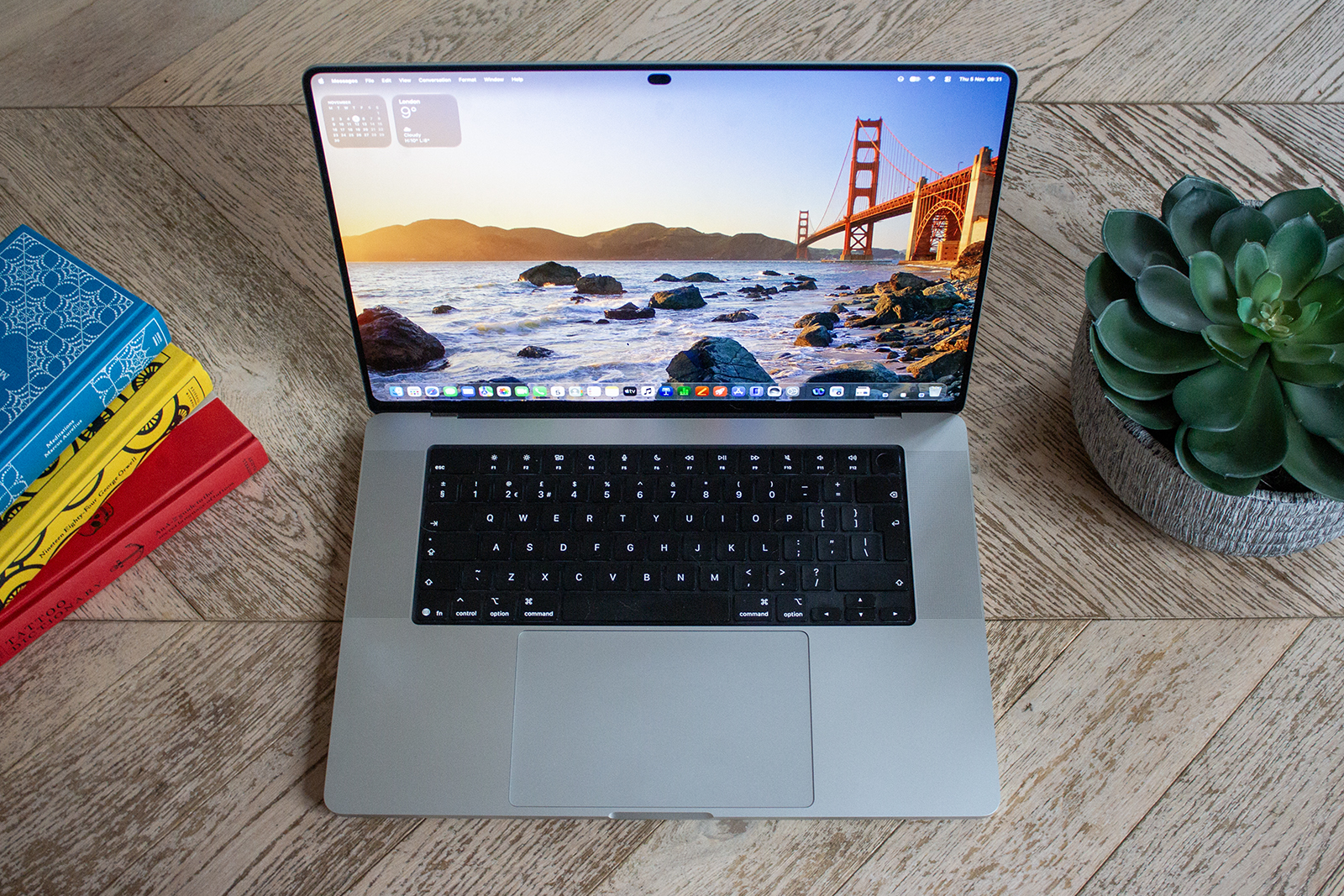
From a design point of view, it’s not a massive change – more on that later – but there are some nice tweaks. The bezel at the bottom of the display has gone, the bottom corners of the screen are now rounded like the top, and the borders are slimmer all round. So the 16-inch display is now 16.3 inches without the laptop getting any bigger. There’s still a decent selection of ports too, including three Thunderbolt 5 ports, HDMI, an SDXC card slot, MagSafe 3 and a headphone jack. And then there’s the glowing Apple logo. It doesn’t do anything useful, I know that, and if I was being picky I’d love it to be multicoloured, but I loved seeing it every time I opened the lid.


IMAGE CREDIT: THE DISCONNEKT
But the display is the highlight here, and it’s glorious. Like the iPad Pro, it uses a tandem OLED panel (the first for a Mac), meaning two OLED layers stacked together to deliver more brightness. Apple calls it PROLED XDR (which isn’t the catchiest of names), and it reaches up to 2,000 nits of peak brightness for HDR and SDR content.
Turn it to max brightness, even when writing in Pages, and it’s so bright you’ll squint at first. Blacks are wonderfully deep, colours pop off the screen, whites are lovely and bright, and there is no blooming you’d sometimes see around bright objects on the older mini-LED displays. Films look great, photos look fantastic, and it’s one of the best screens I’ve used on a laptop, and the best on a MacBook. It also covers Adobe RGB as well as P3 now, which photographers will appreciate, and ProMotion runs from 10Hz up to 120Hz for lovely, smooth scrolling.
Now, I distinctly remember Steve Jobs saying Macs didn’t need touchscreens, calling them “ergonomically terrible”. He wasn’t wrong. It’s more unnatural to lift your fingers to the display than to use the trackpad. But touch is really helpful in some cases. I thought it would be one of those features I’d try for the review and then forget about, but I used it far more than I expected. Scrolling down a web page, pinching to zoom in on a photo, tapping away a notification – I did a lot of it without thinking in the end. Apple has also redesigned the hinge so the screen doesn’t wobble every time you touch it, thank goodness.
“
I thought touch would be one of those features I’d try for the review and then forget about, but I used it far more than I expected to.
The notch has finally gone too, and in its place is the Dynamic Island. If you have an iPhone, you’ll know what to expect. It’s home to the 12-megapixel Centre Stage camera, but it expands to show Live Activities, music controls, calls, camera and microphone controls during video calls, and AirDrop requests. It’s also where you’ll find Spotlight and Siri AI now. Being able to tap it to pause a song or accept a file is really handy, and it works brilliantly with touch. It’s one of the features I use most on my iPhone, so it was never going to take much to win me over on Mac.
Performance-wise, the MacBook Pro is fast, fluid and consistent. I’ll be honest, my workload isn’t going to trouble this laptop – I’m not rendering 3D scenes or cutting 8K video – but everything I threw at it was handled with ease, from editing RAW images to running far too many browser tabs while exporting a video in the background. The M5 Pro offers up to an 18-core CPU, 20-core GPU and up to 64GB of unified memory, while the M5 Max has up to a 40-core GPU and 128GB of memory, so there’s plenty of room for those with much more demanding work than mine. The speakers are great too, and battery life was better than I expected. It’s no MacBook Air, in my experience, but given the display on offer here, it puts in a solid showing and saw me through a working day without a problem. You will need to buy the power adapter separately though.
Four MacBook Pro with PROLED XDR Display specs
2,000
Nits
The PROLED XDR display offers up to 2,000 nits peak brightness for HDR and SDR content, and can dim down to 1 nit.
1.82
Kilograms
The 16-inch model weighs 1.82kg and the 14-inch model weighs 1.38kg.
24
Hours
The 16-inch model is claimed to offer up to 24 hours of video streaming, while the 14-inch model is claimed to offer up to 22 hours.
16
Terabytes
The MacBook Pro with PROLED XDR Display can be configured with up to 16TB of storage with the M5 Max, while M5 Pro models go up to 4TB.
What MacBook Pro with PROLED XDR Display could do better
There’s no getting away from the price, and the MacBook Pro with PROLED XDR Display is very expensive. The 14-inch model with M5 Pro starts at £2,899, and the 16-inch with M5 Pro starts at £3,399. The M5 Max versions start at £4,499 and £4,799, respectively, and that’s before you add any upgrades. Apple still sells the 14-inch MacBook Pro with M6 if you don’t need the OLED display or touch, but if you want the new features, you’ll pay a lot for them. I understand there’s impressive technology inside, but it does mean many people who’d love this laptop won’t be able to justify it.
I’d also have liked to see Face ID, and yes, I know I say this every time. Apple has swapped the notch for a Dynamic Island and added touch, but you still unlock it using the Touch ID sensor on the keyboard. Don’t get me wrong, Touch ID works perfectly well, but when you’re already tapping the screen, unlocking it with your face feels like the obvious next step, especially since the iPad Pro has had Face ID since 2018.


IMAGE CREDIT: THE DISCONNEKT
Lastly, I would have liked a bit more of a redesign. It’s lighter, thinner, and the borders are slimmer, which is all great, but look at it from the side or the back, and it still looks a lot like the MacBook Pro we’ve had since 2021. For such a big update, it would have been nice for the exterior to feel as new as the interior. That said, I’m thrilled the notch has gone, so I’ll happily take that.
macOS 27 and Siri AI on the MacBook Pro
The MacBook Pro with PROLED XDR Display comes with macOS 27, and much of it focuses on making touch work well. Apple’s own apps are already optimised for it, and many other apps work straight away because macOS turns your taps into clicks. Apps like Microsoft Office, Adobe Lightroom, DaVinci Resolve and Blender are getting proper support too, so touch should become even more useful over the next few months.
The other big addition is Siri AI, a much smarter and chattier version of Apple’s assistant. It can use information from your messages, emails and photos to find things for you, answer questions on pretty much anything and complete tasks across apps. It’s built into Spotlight, which now lives in the Dynamic Island, and the two work together well. There’s also a keyboard shortcut for Visual Intelligence, so you can ask Siri about whatever is on your screen. Siri AI is still in beta, though, and some features that use Apple’s servers have daily usage limits, but I have found it to be excellent since I started using it when it was revealed at WWDC in June.

IMAGE CREDIT: THE DISCONNEKT
Elsewhere, Safari can group your tabs into topics and notify you when something is back in stock or drops in price. You can also set up an automation in Shortcuts by describing it in simple language. There’s also a new slider in Settings for Liquid Glass, so if you find it a bit too see-through, you can adjust it from clear to fully tinted. It’s a small change, but it’s always good to have the choice, especially for something you are likely to use every day.


IMAGE CREDIT: THE DISCONNEKT
Should you buy the MacBook Pro with PROLED XDR Display?
The MacBook Pro with PROLED XDR Display is the biggest update to the MacBook Pro in a long time, and it’s a great one. The tandem OLED display is superb, touch is far more useful than I expected, I prefer the Dynamic Island to the notch, and performance is excellent. It’s also lighter and thinner, which makes even the 16-inch model easy to carry around, and the glowing Apple logo is a lovely bonus for anyone who remembers it from the first time round.
There are a few downsides. It’s very expensive, there’s still no Face ID, and I would have liked a more substantial redesign. But if you’re upgrading from an M1 or Intel-based MacBook Pro, or you just want the best display you can get on a laptop, you’ll love it. If portability matters to you, I’d go for the 14-inch, but whichever size you choose, it’s a superb laptop.

IMAGE CREDIT: THE DISCONNEKT
FAQs
The MacBook Pro with PROLED XDR Display was announced on 28 October 2026 and goes on sale on 6 November 2026. The 14-inch model starts at £2,899, and the 16-inch model at £3,399.
The MacBook Pro with PROLED XDR Display swaps the mini-LED screen for a tandem OLED panel with a peak brightness of up to 2,000 nits and Adobe RGB colour support. It adds touch and replaces the notch with a Dynamic Island. It’s also lighter and thinner, with the 14-inch model 14 per cent lighter and the 16-inch model 15 per cent lighter than the equivalent M5 Pro and M5 Max models, and the 16-inch display grows to 16.3 inches. Other changes include speakers with deeper bass, storage up to 16TB with M5 Max, and the return of the illuminated Apple logo on the lid.
Apple claims up to 24 hours of video streaming and up to 17 hours of wireless web browsing for the 16-inch model, which has a 99.6Wh battery. The 14-inch model is claimed to offer up to 22 hours of video streaming and 14 hours of web browsing. Both support fast charging to 50 per cent in 30 minutes using a compatible power adapter.