I’ve lost count of how many times I’ve propped my iPhone against the kettle with a recipe open, only to find it dusted with flour ten minutes later (or worse, locked, with my hands too messy to unlock it). It’s a regular occurrence in my household, especially at weekends when my daughter insists on making cookies and I have to pull up the Hummingbird Bakery recipe I should know by heart by now. So when Apple announced its first smart display, HomeView, I could immediately picture where it would go in my home.
It’s a 7-inch screen on a speaker base that recognises who’s standing in front of it, runs Siri AI, plays music, makes FaceTime calls, and controls Apple Home. Amazon and Google have been making smart displays for years, so yes, Apple is late to the party, as it was with the iPhone Duo. Having swapped my trusty Google Nest Hub Max for HomeView, and living with it for the past couple of weeks, here’s how I got on.
The Disconnekt Downlow
Pros
+ Cute and compact design
+ Personalised experience
+ Excellent cooking mode
Cons
– Limited smart home compatibility
– No IP rating
– Camera doesn’t double up as security camera
I’ve loved having the Apple HomeView on my kitchen worktop. It’s small, beautifully made, and if your household runs predominantly on Apple devices, it fits right in, with profiles for each person and Handoff that moves a recipe, song or call from your iPhone with very little effort. The cooking mode is the best I’ve used on a smart display, and I’ve loved it for music, podcasts and FaceTime, while Siri seems very much at home on it. It’s let down by the smart home side, which only works with accessories already in Apple Home and leaves out popular devices like Ring doorbells, and I’d have liked some water resistance on something aimed so clearly at the kitchen. If you’re all in on Apple, though, it’s very easy to love.
The reasons you should choose the Apple HomeView
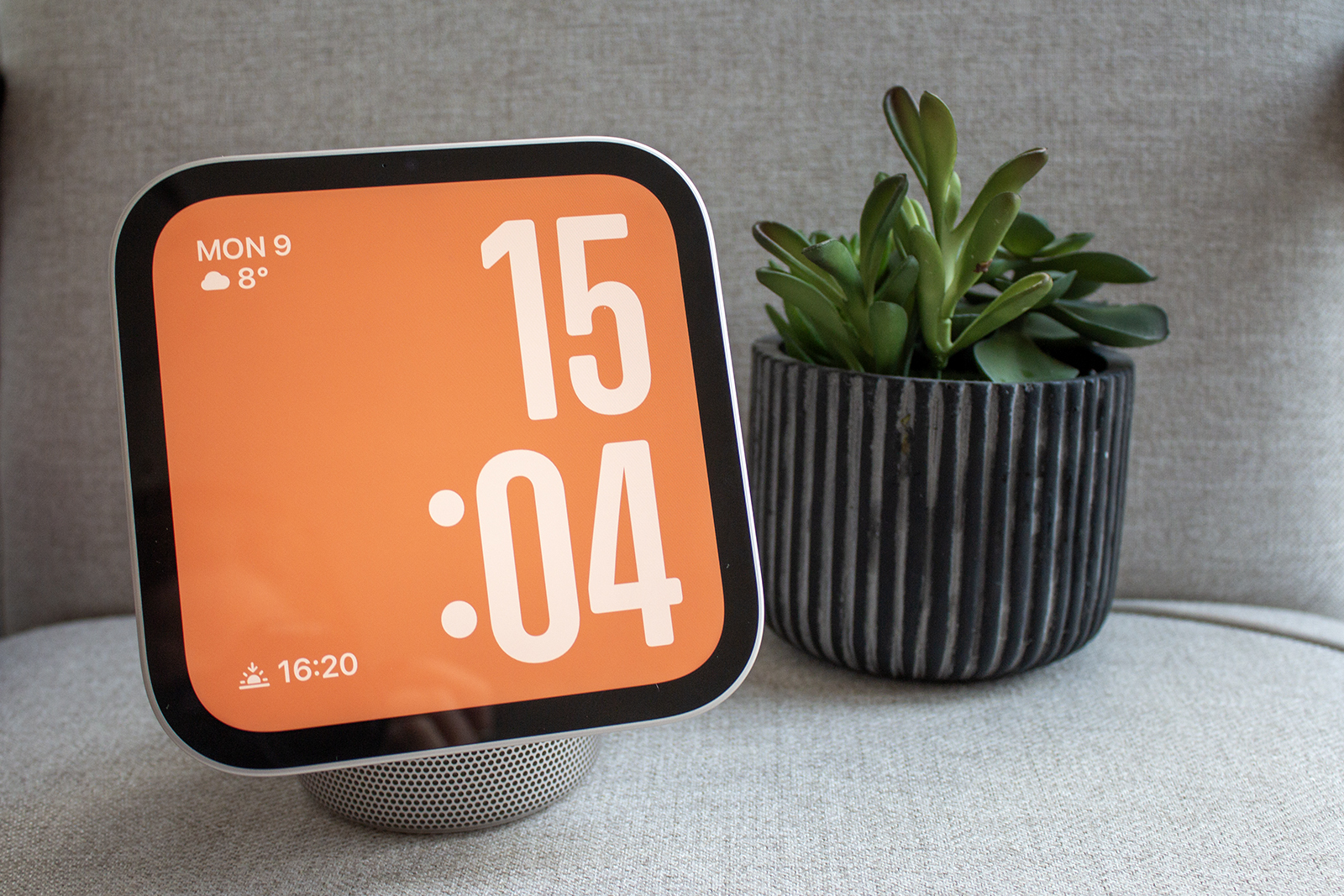
Apple’s HomeView is adorable. The 7-inch display sits on a small domed speaker base, joined by a stainless-steel hinge so you can tilt the screen to suit your worktop or table height. It’s 15cm wide and between 14cm and 17cm tall, depending on the angle, so it takes up less room than a toaster and looks a lot better, too.
Other smart displays typically feature fabric-covered bases, but HomeView’s aluminium finish looks more premium, and its compact build makes it far less intrusive than many. It comes in Starlight, Silver, Rose Pink, and Space Grey colours, and each one includes a colour-matched USB-C cable – it’s a small thing, but I’m a sucker for details, especially when the cable is permanently on show with this desktop model.


IMAGE CREDIT: THE DISCONNEKT
The display is a square LCD screen (it feels like a big Apple Watch), and it’s sharp enough to see detail in recipes, photos and album art, even from across the room. It goes up to 500 nits, which is plenty for a bright kitchen, and drops to 0.3 nits at night, so it would work on a bedside table too, though I felt it had fewer use cases there, especially as it doesn’t have any extras for the bedroom like sleep tracking – something the Google Nest Hub has. The interface changes depending on how far away you are, so from across the room you’ll see big, simple information like the day’s high and low temperature. As you walk towards HomeView, it adds detail like the hourly forecast. This means you can glance over from the hob and still read it.
There are also plenty of faces to choose from. The Photos face can pull from a shared family album, so new pictures appear as soon as someone adds them (I used to love this about the Facebook Portal we bought for my grandma a few years ago). There’s also an animated Snoopy face (always a firm favourite), a calendar, weather, a few clocks, and a Home Camera face that can show up to nine camera feeds at once (assuming you have compatible cameras). You can customise the faces too, from widgets and fonts to colours, so there are plenty of ways to make it fit into your home.
“
When I asked Siri something that required personal context, it pulled from my calendars, emails and messages rather than my husband’s, and switching between profiles has worked well.
But the biggest win for me was how well it works for a family. HomeView can recognise up to six people by face and voice, and each person gets their own Home Screen with their own apps and widgets. When it detects me, it shows my calendar, reminders and messages, pulled from my iPhone. When someone else walks up – like my son, daughter or husband – it switches to theirs.
That personal content appears only if your iPhone is nearby and has been unlocked recently, and clever authentication methods are in place if it isn’t sure. When I asked Siri something that required personal context, it pulled from my calendars, emails and messages rather than my husband’s, and switching between profiles has worked well, whether it happened automatically or manually via Control Centre.
Four fun facts about Apple HomeView
0.3
Nits
The display can dim to 0.3 nits, which is good for a bedroom, and it tops out at 500 nits.
7
Inches
The HomeView has a 7-inch Liquid Retina display with a 1088 x 1088 pixel resolution at 220ppi.
6
People
HomeView can recognise up to six people in a household by their face and voice.
9
Camera feeds
The HomeView Camera face can livestream up to nine compatible camera feeds at once.
A day in the life of the Apple HomeView
My kids absolutely love HomeView. Both have Apple accounts on their iPads, so it was easy to set them up once they learned to turn their heads for facial recognition. After they were set up, they had a great time asking it to play music, singing along to the lyrics on the screen and irritating the rest of the household without a second thought. They asked Siri plenty of questions, which saved me a job, and my daughter loved watching Snoopy on the screen through Apple TV.
Handoff was one of the features I used most. If I was listening to something on my iPhone, on a FaceTime call, or looking at a web page, I loved that I could hold my phone up near HomeView’s screen and it would move across. It took me a little time to realise I couldn’t just place my iPhone next to HomeView on the worktop, but I’m glad that’s the case, or things might have been handed off when I didn’t want them to be. When I had my phone in one hand and a wooden spoon in the other, it was excellent, though. I’ve used it constantly for recipes I’ve found on my phone and for moving calls over when I need both hands free.


IMAGE CREDIT: THE DISCONNEKT
The cooking feature is brilliant, too. Open a recipe in Safari, either on the HomeView or handed off from your iPhone, then tap the cooking icon. It cuts the page down to the recipe itself, so no more scrolling past adverts and someone’s holiday memories with sticky fingers to find out how long something needs in the oven. There’s an ingredients list you can tick off as you go, then a Start Cooking button that splits the method into single steps, with timers for each step so you can start them with a tap or by asking Siri. So far, it’s worked with all the recipe sites I’ve tried, and that’s almost reason enough to buy one.
I’ve also loved it for music and podcasts. There are two full-range drivers in the display, plus a down-firing woofer and two passive radiators in the base, and it sounds fuller than you’d expect from something this compact, with decent bass and clear vocals. Apple Music looks lovely on the square screen, with animated album art and lyrics, and podcasts are easy to browse and control by touch or voice. Audible is also compatible, and there are some options for narrated news too, though these are limited.

IMAGE CREDIT: THE DISCONNEKT
FaceTime works well too. The 12-megapixel Centre Stage camera kept everyone in shot as they moved around, so I could chat while cooking without having to stand still in front of it, and the kids could join in to say hello without anyone getting cut off. Calls were clear thanks to the four microphones, and being able to pass a call from my iPhone to the bigger screen with Handoff is great when a quick catch-up turns into an hour-long one (happens more often than I am prepared to admit) and there’s dinner to cook.
Elsewhere, I liked using Intercom to call the kids down for dinner, and the named timers were helpful too. I have also used Find My a lot – it’s found my AirPods multiple times after I’ve left them in my coat pocket following a dog walk, and it’s helpful to check my mum’s location as school pick-up time approaches so I know she hasn’t forgotten the little rugrats. Siri was also great for me. I’ve said in previous reviews that I’ve been impressed by Siri’s new capabilities, and it has worked especially well on HomeView.
What the Apple HomeView could do better
The smart home side is where the HomeView falls a little short for me. Don’t get me wrong, anything you’ve already set up in the Apple Home app appears straight away, with no extra setup, so lights, thermostats, locks, and HomeKit cameras are all there to control by touch or voice (assuming you have some). The Home Modular face puts your favourite accessories on the screen, and scenes and automations work as you’d expect. It also acts as a home hub, so it can run automations when you’re out.
The trouble is that HomeView only works with HomeKit and Matter accessories, and many popular smart home kit support neither. Ring doorbells, for example, aren’t compatible, so you can’t see who’s at the door on HomeView if you have one (doesn’t basically everyone?), which is one of the main things I’d want a kitchen display for in a smart home. If you’ve built your smart home around Alexa or Google, you’ll likely find gaps too.

IMAGE CREDIT: THE DISCONNEKT
My Nest Doorbell and Nest security cams work better with the Nest Hub Max, though that smart display doesn’t feel as personal as HomeView, so it has pros and cons. Apple’s own Home Collection, which includes cameras and a video doorbell made by LG, should help reduce some of the compatibility drama. Some accessories will be available to pre-order on 13 November, though they won’t arrive until December, so it could be a little time before HomeView shows its full capabilities with them. I can’t imagine they will be cheap, either. For now, how useful HomeView is as a smart home dashboard depends on what you already own or what you’re willing to replace.
My second moan is the lack of an IP rating. Apple designed the HomeView as a communal device, and in my mind the most obvious place for it is the kitchen. The company highlights recipes and timers as features, and cooking mode is one of its best, yet there’s no official water or dust resistance. With a sink, a kettle and a hob all within splashing distance in a normal-sized kitchen rather than a mansion, you’ll need to think more carefully about where it sits than you should have to.

IMAGE CREDIT: THE DISCONNEKT
The camera also doesn’t double as a security camera. It’s good for FaceTime, as I mentioned, and it has a mirror feature, which is rather fun even if it wasn’t something I found myself using much. For a device that’s designed for the home, you will likely have at least one mirror somewhere that will give you a better view of your face than a camera and screen will. But unlike the Nest Hub Max and Amazon’s Echo Shows, you can’t see inside your home remotely using that camera. There are perhaps some privacy considerations there, but it’s still a feature I’d like as an option.
Lastly, and these are smaller gripes, there’s no physical switch to turn the microphone and camera off, and radio isn’t as smooth an experience as music. Apple Music has clearly had most of the attention, with animated artwork, lyrics and slick controls, but getting a radio station going is harder. If you’re looking for BBC radio too, you’ll need to use AirPlay – like HomePod, you can’t ask Siri to play that, as BBC Sounds was removed from TuneIn, so, as I said, a slightly clunkier experience. There’s also no Netflix app support. You can watch Slow Horses in the Apple TV app (or Snoopy, as I mentioned), and you can watch YouTube or Netflix through Safari, but given that Netflix spent so much time designing a great app for iPhone Duo, it’s a shame not to see a native app here.


IMAGE CREDIT: THE DISCONNEKT
Should you buy the Apple HomeView?
If your household runs on iPhones like mine, the HomeView is very easy to recommend. It’s lovely and compact, looks right at home on a kitchen counter, gives everyone in the family their own personalised experience, and Handoff is simple and works a treat. The cooking mode is excellent, and I’ve loved it for music, podcasts, Siri and FaceTime calls.
But it has its weaknesses. The smart home side is only as good as what you have in Apple Home, so if you rely on a Ring doorbell or other kit that doesn’t support HomeKit or Matter, you’ll be left wanting. The lack of an IP rating is frustrating for a device so clearly built for the kitchen, and I’d love to see the camera double as a security camera to add functionality.
Meanwhile, if you’re in an Android household, or your smart home is built around Alexa or Google, this isn’t for you, and an Echo Show or a Nest Hub will make more sense. But if you and your family are predominantly iOS users, the HomeView is a charming first smart display from Apple, and it has settled right at home in my house.

IMAGE CREDIT: THE DISCONNEKT
FAQs
The Apple HomeView costs £299 in Silver, Starlight, Rose Pink or Space Grey. The HomeView (Wall Mounted) is also £299, in Space Grey or Silver, but the Schneider Home mounts are sold separately, starting at £54.95. Both are available from 13 November.
HomeView works with HomeKit and Matter accessories, and anything already set up in the Apple Home app appears on it automatically. Devices that don’t support either, such as Ring doorbells, won’t work with it.
No. The HomeView doesn’t have an IP rating for water or dust resistance, so keep it away from the sink and hob.
Yes. Setting up the HomeView and adding multiple users requires a compatible iPhone or iPad running the latest software. Personal content such as Messages, Calendar, and Reminders is shared from each person’s paired device, but it must be an Apple Intelligence-compatible device.
No. Apple isn’t selling the HomeView in the European Union for now, as Siri AI isn’t currently available on iOS there. It’s on sale in the UK, US, Australia, Canada, India, New Zealand, Singapore and South Africa.